Posts

Showing posts with the label Year 3

Major Project: Reflective Statement

This last project has pushed me to the edge of what I can do along with encouraged me to think more and more about my work. It has also challenged me to change my mind set with my work, going from panicking and hated it to challenging it every day and finding something new about it. I’ve also learnt to open-up more about what I do and to become more accepting of the feedback I am given and to push forward with it. The place that I felt I was the strongest in was thinking up the designs for my characters. Going over each part of them and improving their designs with the feedback that I was given really helped me to create much stronger designs than the one that I was working with over a year ago. I was able to step back and let the skills that I had in one area help decide the elements that was needed for the characters. I was also able to keep them in an art style that I was comfortable using and it became very up lifting to see them come to life in a 3D space. Animating them was s...

Major Project Submission

Image
Major Project - Post Viz from Rhia Crouch on Vimeo .

Major: Updated Turn Arounds

Image
The completed textured models of Sun and Moon. This time their textures have the final designs and effects on them along with a closer look at the characters' crowns.

Major: Stage Updated Textures

Image
The stage now has it's updated textures as well. It did have to edit the Earth in the middle so that land on it looked more realistic. The fully textured stage Earth Texture Stage ring one Stage ring two Stage ring three Stage ring four

Major: Sun Up Dated Textures

Image
Sun now has the wooden effect on his textures. This one was alot more difficult to do because of the patterns on the body and arms. I also changed some of the base designs alittle as their were not matching up or there was a detail that still needed to be added. Sun Render 1 Sun Render 2 Sun Render 3 Sun Render 4

Major: Full Animation Playthrough

Image
I've completed the animation that I plan to use for my final animation. I know that some parts need to be edited abit, such as updating textures, moving the characters about and stoping them clipping in to themselves, but I'm just happy that I was able to completed the whole poem.

Major: Star Appearing Test

I had to do some tests to see if the way that I had planned for the stars to appear would work for my animation. I had planned for them to appear on the background texture, with the textures fading into one another, but as I was using a domelight this seemed to be impossible to do. So I chose a plan that I knew I could do and would be some what easy to set up. I modeled some stars and placed them around the scene. After this I changed the transparency so that it looked like they were magiclly fading in. I also added a small animation to the stars so that they did just sit there. Star Animation Test Video from Rhia Crouch on Vimeo .

Major: Stars Model Textured

Image
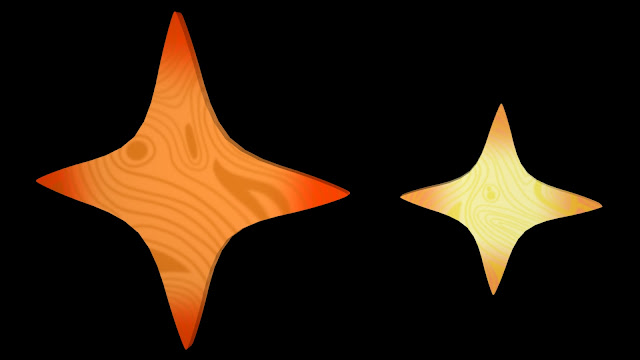
When I was texturing the stars I decided that their should mimic the same colours that are used on the Sun character such as reds, oranges and yellows. I am thinking that I should make a third star that is smaller than the yellow one but I'll see how they look in the scene first. Large Star and Small Star Textured

Major: Stars Model UV

Image
I have now gotten to another part in my animation where I've had to create another prop for the scene to help me move on to the next part. The scene in question is when the stars start to appear in the sky after the crown breaks, I wasn't too sure how I was going to do this so decided to try somethings out. I was thinking that I could easily change the texture of the skydome light so that it would look like the stars where fading in to view but after looking around the settings I found this would be too difficult to do, so I decided that I would use stars that I've modeled in Maya and find a way of changing the visibility of them to make them fade in. I did have to keep in mind that the stars had to be simple shapes so that they fitted in to my work, so I picked a simple 4 pointed star shape as I felt that this would match up with the pieces seen when the crown breaks. Large Star And Small Star UVed

Major: Shattering Test

In one part of my animation the Sun's crown shatters in to a number of pieces after being thrown by the Moon. I wasn't too sure how I was going to do this in Maya but I learned that I could create the effect that I wanted in After Effects, so I decided to try it out and do a test. After Effects Shattering Test from Rhia Crouch on Vimeo .

Major: Moon Up Dated Textures

Image
I've been updating Moon's textures so that she look like she is made out of wood. It was a challenge to find ways of making the markings line up with eachother but I found making some parts fainter than others does make hiding the eachs alot easier. I didn't put the wood effect on to her head texture as I felt that they would have been distracting and would have meant that I would have to redo the eyes again. To make sure that this does stand out too much the lines on the neck are alot fainter than the rest of the model. Moon Render 1 Moon Render 2 Moon Render 3 Moon Render 4 Moon Texture Map 1 Moon Texture Map 2 Moon Texture Map 3 Moon Texture Map 4 Moon Texture Map 5 Moon Texture Map 6 Moon Texture Map 7 Moon Texture Map 8 Moon Texture Map 9

Major: Crown Moving Issue

Image
As I've been doing the object exchange tutorial to help me move Sun's crown off of his head so that it looks like Moon is holding it, I came across a problem. When the Crown Locator has to swap from the World control to the Moon control that I've set up, it will suddenly jump to a different location in the scene even though it is one frame apart. I don't know if I have to use a different value to make it stay with the hand as Moon moves round or that I'm going to have to animation that shot by hand like I've done with everything else. Animation Blooper from Rhia Crouch on Vimeo .

Major: Animation WIP 1

This is an updated work in progress of my animation to see well it is fiting in with the audio so far. I can tell that some parts of the animations are moving a bit too fast and so will have to be edited so that their don't zip across the screne. Animation WIP 1 from Rhia Crouch on Vimeo .

Major: Spinning Prop Model 2

Image
Decided to test out texturing the spinning pop-up to see how be I would have to make the sun and moon images on the dicses and see if I would have to change the style of them. I will have to go back and edit them a bit more so that they have more details and the wood effects, I might also recolour the textures so that it matches the colours used on the characters. I've also been thinking that I should add another small brown disc to the middle of the pole so that it looks there is a pivot point on the prop control it. Spinning pop-up model texture

Major: Spinning Prop Model 1

Image
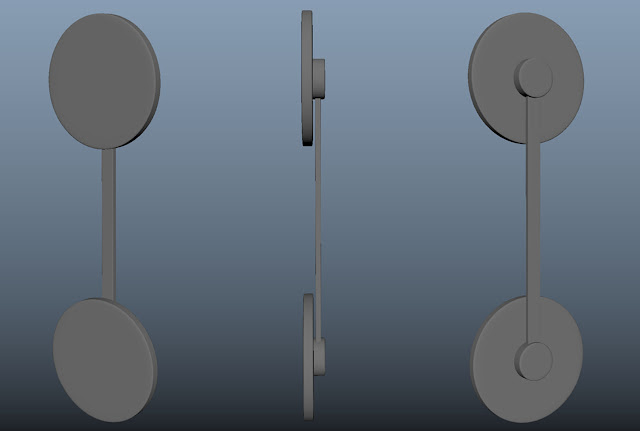
For one part of my animation the Moon will say "My realm will overshadow your kingom" to the Sun after he has annoyed one too many times. I felt that this line was one of the most import in the story as so would need a way of standing out so that it has an impact in the animation. The idea that I had in mind is that the camera pulls out to show the whole of the stage along with showing a images of the sun and moon that are hanging up in the sky. As the line is being said the images would spin round so that the moon is on the top, as in 'her realm' is now 'overshadow'ing the Sun's 'kingdom'. Spinning pop-up model

Major: First Playblasts

As I been animating I have been playblasting the scenes so that I can get an understanding of what the shot is looking like when played through. I'm doing this as in Maya the animation stutters sometimes because of objects being turned on and off along with the face textures switching between each other. As I have be doing this I have been finding problems that have made me think about the ways that I frame my shots along with the way that the characters are rigged. Some of the shots that I had wanted to used now seem to be too difficult to do with the style of the stage that the characters are standing on, such as the camera turning round abit to show that the Sun has been watching the Moon became too taxing so I had to drop the it and have the camera cutting back to the Sun instead. It also helped me to spot parts of the video that will need to be edited for the final film, such as adding in a close up shot of the characters at the begining before fading to the next shot show...

Major: Sky Textures Test

Image
I've been thinking about the style of the background for the animation. I havn't had many ideas as to what it should look like but I know that it should fit around the stage that the characters stand on. Background Test 1 The first background test is acting as the place holder while I animate the characters. It was also the first ideas that I had about what the background could look like, following along the lines of it looking painted like the characters. Background Test 2 The second design is based off of the first idea but I wanted to try out a different patten style. I'm not too fond of this one as I feel that it looks too much like the night sky with stars which shouldn't make sense in my story. Background Test 3 I did get some feedback after I post some renders that showed the place holder background I was given the idea of useing shapes, as this would relate back to the shapes used to build up the characters. This could be where I go with the ba...

Major: Stage Texture Test

Image
After I tried out the colours for the pop-ups I designed to try them out on the stage to see how they would play out. I also wanted to see how the dome in the middle would look as the Earth, as the Moon and Sun would mostly be on either most of the time along with adding a nice centerpiece. I might redo the Earth abit more so that the pattens on the texture have more shape.

Major: Pop-up Textures Test

Image
Testing out what the base colour should be for the pop-ups. I was thinking of useing colours that seemed similar to different types of wood, but I feel that these colours are abit too strong so I might have to tone them down a little bit. Any feedback is welcomed. Farmer pop-up and Corn pop-up Can't sleep pop-up and Jack Frost pop-up Lovers pop-up and Sleep pop-up Travelers pop-up and Waves pop-up