Posts

Showing posts with the label Illustrator tutorial

Illustrator tutorial - Colour, Shadows and Light
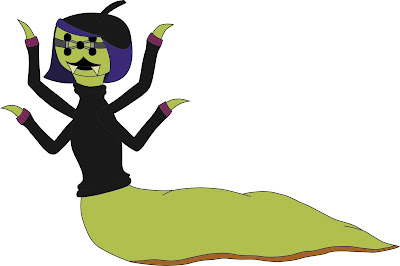
Image
Starting off for where we finished last week with our characters we started to look at colouring them in along with adding looking at ways that we could add shadows and highlights. Colouring in the character is quite an easy thing to do once you have outlined the drawing, just by clicking on the Live Paint Bucket Tool you can fill multiple areas in with the same colour and not risk going over the lines. One thing to keep in mind is that you should create another layer, underneath the linework layer, to work on so that if you make a mistake it can be fixed without the risk of messing up the whole drawing. Filled in with colour After doing this you can make the drawing more rounded and seem more detailed just by adding in highlights and shadows, the best way to do this is by working on different layers as you will need to apply different settings to them to get the effects needed. To apply the settings you need to click on the small circle, or Meatball , that is on the layer and ...

Illustrator tutorial - The basic outline

Image
When designing different parts for an animation making some of the ideas clearer than others, this helps to plan out some of the finale ideas that could be used for the props, sets and characters.  To get an understanding of this we were set with designing our own background characters that could be used in PIXAR's Monsters University and so that we didn't just design something straight out of our heads we were given prompts to what each of our characters should include . Mine were: Artist/ Beatnik 1 Leg 4 Arms 5 Eyes After sketching out some ideas, using these rules, for the character I finely came up with the final design that I was happy with to put into Illustrator. The final sketch I have never used Illustrator before and just trying to understand the basics of using the pen tool took sometime but after a while I got the hang of using the Alt-key to create sharp turns and the holding down the left mouse button to make a bend. Finished outlines...